Sunday, November 24, 2013

Can you add some technology to that, please?

My grade 10 Communication Technology class is about 3 weeks into our project.  I am excited and anxious about this project as it is the first time that I have really stepped back and let the students develop their projects .  The class had to create a project overview sheet to help them plan.  And while it has been difficult and a bit unnerving as I share control of the activities and learning that is going on in my class, I find myself continually asking my class, "How can I help?", as I want my students to be successful as they step into their projects.  My part in their learning experience now is to provide support. Aside from leaving the room so I stop bugging them, some ways that I am supporting them are by providing instruction and suggestions that can help them manage their projects.  The students have the choice of using Scrumy or Linoit  to use for their project management.  Both of these resources can be shared with me, allowing me to peek in on their progress from time to time.  These tools also bring in a level of accountability for the students.  They can no longer say, "I've got it all right up here." as they point to their heads.  The planning stages of their project is crucial to its success.

Earlier, the class did a Gallery Walk protocol. All students/groups completed their project overview, taped them to the wall and other students, and some other teachers, provided feedback on the project under the confines of "be positive, be helpful, be specific." On the project overview sheet, students need to intentionally consider who their audience would be. Many of the projects involve the creation of videos, so naturally, the response by many was Youtube.  After some discussion with our classroom guest teachers, it was evident that Youtube was not an audience but rather a tool to be used to reach an audience.  This led to a great opportunity for a mini lesson, Four Square Protocol, a discussion about the purpose of an audience, technology tools that can be used to communicate to an audience and how an audience can shape the actual project.  The conclusions that the class have reached mirror some of the conclusions that I am drawing from my own research; it is important to use technology for successful projects and it is also important to understand that technology should not be what is driving our projects.  Instead, technology should be tools that we use create artifacts and to convey our message.

For those of you who have been following my journey of completing my M.Ed. project on developing a rationale for using technology in PBL and the creation of video tutorials to accompany the rationale, I am please to say that I am in the final stages of my rough draft and have created several videos.  If things go according to schedule, I hope to be completed in the next month or shortly after.

Sunday, October 20, 2013

Revision and Reflection are Allowing me to Learn!

I have been working on some of the video tutorials for my portfolio.  I am enjoying making the videos about technology and how technology can, and I would say needs to be used to, support Project Based Learning.  The creation of the videos could not be possible without the readings, research and thought that I have put into the topic of "how can technology support PBL," As I have been making the videos, a lot of revision and reflection has taken place.  I would sometimes revise a script, edit a video, recapture part of my screen shots and occasionally start all over.  I have so far created three video tutorials for this project, with the rest coming pretty soon.  I am enjoy the making of the videos because I am passionate about discovering how technology works best in education and I enjoy providing resources to help other teachers. The creation of the videos is the learning process in that I can now really put theory to practice in the creation of artifacts for an audience.

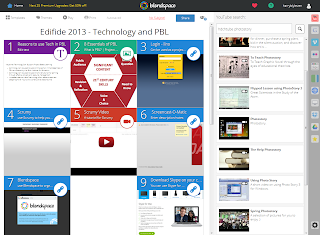
For the videos, I have been attempting to find out what tools and resources to include in the videos and which ones to not include.  I am trying to find resources that can be used by both the teacher and the student.  I am also trying to include resources that have multiple uses and tie into several of the 8 Essentials of PBL.  My favourite online tool right now has to be Blendspace.  Here is an example of a Blendspace that I have made for a workshop I will be giving on "Using Technology to Support PBL" at the Edifide Teachers Convention in a couple of days. Blendspace helps the teacher to manage the information and resources that students will need as they work on a project.  With its grid set-up, Blendspace organizes the online learning space.  To create a Blendspace the owner of the space quickly and easily drags and drops in resources from YouTube, Google, Vimeo, Flickr, EduCreations, Dropbox, Google Drive, bookmarks for links, or they can upload their own resources and multimedia files.  For the student, Blendspace can help them organize the videos, websites and resources that they are working on - it can be a digital notebook.  Blendspace can also be used as a digital portfolio tool allowing students to post their findings, creations and it can be easily shared with others.


While I am currently working at completing both the written portion of my Masters Portfolio and the video tutorials, I am finding that the two components really drive each other.  The theory aspect of having a rationale for using technology provides a necessary grounding that the foundation of the practical videos need.  

I am currently in the Revision and Reflection stage of my portfolio.  I must admit that it feels great to be able to say that because if you look at the 8 Essentials of PBL, as modeled by the Buck Institute for Education, in the following diagram, then you can see I am on the home stretch.  One of the challenges that I have recently experienced in my work is that I am looking at each essential separately rather than looking at all of the essentials as a collective process. This has put up some temporary roadblocks for me as I cannot see this topic ever being completed - which has been a really big struggle for me! It is my hope that in the next 3-5 weeks that I can complete my work - even though this area of work will likely never be finished due to its ever changing nature.  

Wednesday, September 11, 2013

A Boy, Constructivism and LEGO!

I have just finish a section of my final project for my M. Ed. degree.  My overall topic is the implementation of technology into a Project Based Learning. The section I am currently working on is about Constructivism. My research is pointing to how teachers who incorporate technology into their teaching practices generally become more constructivist in their pedagogy choice and delivery.  This often leads to teachers adopting an Inquiry Based Learning strategy.  In the school where I currently teach, Hamilton District Christian High, we have been implementing and using  Project Based Learning.

I like this simple definition of Constructivism from Wikipedia:

Constructivism, as a perspective in education, explains how knowledge is constructed in the human being when information comes into contact with existing knowledge that had been developed by experiences. 

As a teacher becomes more familiar with technology and begins to use it more for their own learning, the next step is to ask the same of your students.  The role then is to help students on their journey of learning by providing a safe learning environment, access to resources and a structured environment in which they can learn.

Now permit me a little brag moment about my son who is just entering grade 4.  Like many kids, school is sometimes fun, sometimes awesome and sometimes boring.  So far the start to this school year has been on the sometimes fun side.  
He needs a reason to learn - he wants to know "why this is important". He also loves LEGO - well really, who doesn't?  He normally gets a new set, builds it, plays with it for a while and then just has it for display on a shelf in his room, our family room, our dining room and our living room. 

Recently he has also developed an interest in super hero movies.  He was a bit disappointed to discover that he would not receive every super hero LEGO set just so he could have the characters to play with. He also realized that he had lots of parts from various LEGO characters of sets that he did not wish to keep.  It become his project to construct his own set of custom LEGO Super Heroes.  He did not just want to make random Super Heroes - he wanted to make his "customs" look as close to the real characters as possible.  It is amazing how much research that he did in order to create his "customs".  He would often just grab the iPad, find images (front and back) and YouTube videos of the authentic character, get his Sharpies, and model paint and start customizing his characters.  Throughout the process he would ask for feedback, not just to receive praise but also to make his characters better.  When he would run stuck on an aspect he would consult the experts - more YouTube videos, his LEGO books, his mom (a talented and precise artist) and his Papa (a talented and precise doll house builder with a big paint selection).  

Each character could take a couple of hours or even days as he patiently waited for paint to dry and the next coat or accessory to be placed. Not every first edition was exactly as planned. He would revise or "do over" until he was happy with the product.  Once a character was complete he would again grab the iPad and create a video about the character and the process necessary to make it.  We haven't uploaded the videos yet, he wants to wait until he is all finished but he has allowed me to snap a couple of pictures.


What has been amazing for me, as a father and teacher, to see is that there was a purpose that was driving the learning and that my son was able to learn from drawing on his past experiences, research how to make and create his "customs" and be able to share his results (soon) with others.

Having seen all of this unfold in the last couple of weeks fuels the fire for me to continue to ensure that my students also have a reason to learn. I want to provide them with authentic learning experiences in which they too can construct and shape their learning.

Saturday, August 10, 2013

Overwhelmed, but going in the right direction.

The research stage of a project can be overwhelming.  I will admit that this is the case for me as I am working on the written piece for my Master Portfolio.  The really hard part is just telling myself to start the writing process.
http://scriptcat.files.wordpress.com/2012/03/research1.jpg
I have thoroughly enjoyed finding, reading and taking notes from the many chapters, articles, blogs etc that I have read about Project Based Learning and technology.  As I work towards developing a solid rationale for using tech in PBL, I am also thinking about which technologies and tools that I wish to highlight via video tutorials.  As I move along and develop the rationale and the 4 key points that I will be focusing on (see previous post) I was reminded of the need to organize, synthesize and catalogue my findings thus far.  Just the process of organizing and grouping my findings has really helped to ease the "overwhelming" feeling and knot in my stomach about "getting going" with the writing process.  I like to run (an ankle injury has recently slowed me down, however).
In the winter I run on a treadmill and watch movies on my laptop to pass the time. Last winter, I watched Finding Forrester.
http://haingu.files.wordpress.com/2011/02/r__findingforrester4.jpg
 
The movie is about an author mentoring a teenager who is a gifted writer.  One of my favourite quotes from the movie is "No thinking - that comes later. You must write your first draft with your heart. You rewrite with your head. The first key to writing is... to write, not to think!"
This quote is now reminding me to just get in there and write and to run with it!

Friday, July 19, 2013

Key Reasons to use Tech in PBL


During the last couple of days, I have been doing a lot of reading about Project Based Learning (PBL) and technology. Specifically, I have been reading how technology can and needs to be used to support learning in a PBL model.  The readings do not out-rightly say that PBL needs technology but that using technology to support PBL is needed. As I work on the final project for completing my Master of Education degree, I am attempting to develop a rationale for using technology in PBL.
I currently am leaning towards a number of key reasons for using technology in PBL. One of the fun things about researching is that you start to read a number of articles, blogs, wikis, tweets and posts that provide you with new and unexpected ideas.  The last part of the rationale for why technology should be used in PBL suggests that much teacher growth, professional development and teacher leadership can be fostered and developed in teachers that incorporate technology into their PBL teaching.  While the particulars and supporting research are not yet included, it is these key reasons below that I am currently working with as to why technology should be included in PBL.

Key Reasons for using Technology in PBL

  • while PBL does not need technology per se, technology can support the learner and the learning process.  I believe that each of the Eight Essentials of PBL can and should be supported by technology. One of the products that I will be creating and sharing as part of my Master's project is a series of video tutorials showcasing technology for each of the Essentials with goals of providing educators and learners with tools that permit them to dig deeper into their learning
  • technology allows for effective planning and management of learning projects. Managing projects, getting student feedback and reflections, and providing students a voice and choice is believed to be readily completed through the use of technology and online tools
  • as teachers learn, and in turn use, more technology in their teaching, their teaching often becomes more constructivist in nature - this should lead to better PBL
  • technology supports Growing Success.
    Growing Success is an Assessment and Evaluation Document for the province of Ontario (Canada). The document empowers teachers with much freedom in terms of assessment tools, collections of information (including conversations and observations) and evaluating students. An important part of Growing Success is Assessment for Learning, Assessment as Learning and Assessment of Learning
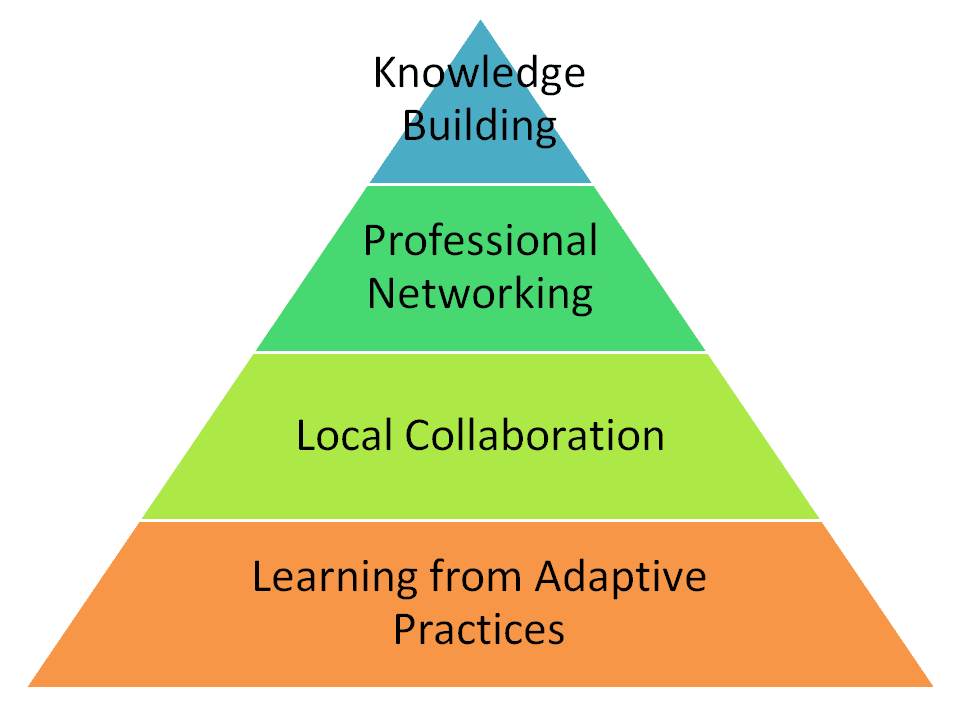
  • using technology in PBL can foster professional growth, professional development and leadership among teachers. Riel and Becker discuss the idea of Teacher Leadership Practices and present their model (pyramid).  This model also is similar to the SAMR model for "Empowering Students with Technology" 

  • Some other important points that I am considering are how technology is supported in my school, how the ISTE Standards can be brought into the PBL - most likely in the 21st Century Learning skills, and the actual density of technology available for learning in our school.

    My steps in the next couple of days are to look more at PBL for 21st Century Success. This book, by Suzie Boss of the BIE, focuses on how the skills of; Critical Thinking, Collaboration, Communication and Creativity are taught, assessed and evaluated in a PBL setting.  My readings are leading towards  technology also playing a key role in this.

Tuesday, July 16, 2013

Project Based Learning and Technology

It has been a long time since I last posted - a little over a year.  My last post was about optimism for the 2012 Blue Jays season.  If you follow baseball the Jays still aren't giving much reason to be optimistic as a fan.

I am getting back into my blog again for a couple of reasons:

  • it seems like the right thing to do again
  • I intend to use this blog to record my reflections and my journey as I dive into completing my Masters of Education Portfolio through Lakehead University about Project Based Learning and how technology can support the learning
  • I was also inspired by many great people and educators as I attended PBLWorld in June who blog on a regular basis. - for a summary of the Coaching Academy that I attended at the conference please visit the blog of Bianca Hewes who is an avid blogger, and PBL leader
  • I want to use this blog as a platform to get my thoughts and the resources that I gather organized and consolidated in one spot
Over the next several months, I will be working at answering the following Driving Question;

How can I use literature and PLNs to develop a rationale and provide examples for educators to incorporate technology into PBL?

If you wish to read my full proposal it can be found here.

My hope is to develop a sound rationale for using technology to support Project Based Learning as well as to provide video tutorials of specific technologies that support PBL - like a how-to video. The Buck Institute for Education has an well respected and robust model of PBL and it is their model that I will be using as I continue my work.  For more info on their model please visit http://www.bie.org/about/what_is_pbl/ .

The BIE does provide an info-graphic of their model which outlines their 8 Essentials of PBL. The video tutorials that I create will be related to these 8 Essentials.  

I am beginning to dive into some of the readings to help develop the rationale. Here are a couple of the articles that I currently thinking about.
The next steps for me are to continue on in my readings and researching how technology supports learning and specifically Project Based Learning.  I will also be developing a rubric/metric to help find appropriate technology that educators and students can use in their projects. 

I will be using my Personal Learning Network (PLN) of learners and educators to bounce ideas off of and to solicit opinions, ideas and resources.  If you are reading this then I hope that you might also take the opportunity to become of my PLN. This is most easily done by commenting on this blog or by following me on twitter @hblyleven


Friday, April 20, 2012

Batter up!


I enjoy baseball.  I was able to see the Blue Jay's home opener recently with some great friends.  I even had the fortune to be interviewed on City TV. 
My dad's cousin, at least to the best of our knowledge that is the relationship, is a Baseball Hall of Famer.  Bert Blyleven was a major league pitcher for a few teams and he was a member of the World Series Pirates (1979) and Twins (1987). His best pitch was the curveball.  Many baseball analysts will still compare others pitchers' curveball to Bert's.  If you have ever played baseball, fastball, or slow pitch, it is always amazing to see how the baseball can move and quickly change direction.  I had the chance to pitch a little bit when I played fastball.  My best pitch was also a curveball.  Sometimes I could really confuse a batter by starting the pitch outside and moving it in or in the middle and then outside.  As a batter, I too was often fooled when thrown a curve.

Every once in while life throws us the occasional curveball.  Sometimes we have plans but our plans don't always work out the way that we had hoped for various reasons.  I guess I think that God likes a good baseball game.  I say this knowing that God has a plan for all of us.  These "curveballs" that we try to swing at are usually the things that we wish to do and God, sometimes with a slight curve or sometimes with a big swooping curve, reminds us of His plans for us.  I am reminded and often humbled by Jeremiah 29:11.


If you recall from my very first blog post I mentioned that I would be trying blogging and tweeting on a regular basis.  My curveball, or obstacle, I believe was that of time.  It is not that I did not have the time, however, it was how I was using my time.  I think it is important that I keep maintaining my blog.  I have just finished a very busy past three months - I have wrapped up some teaching at Redeemer and just this week finished a course that I was taking.  Each of these activities threw some curveballs at me.

In the Comm Tech class, it was the hope to have the students blog weekly as part of their presentations  of learning and reflection.  I can honestly say that it did not work as initially hoped.  Some of the class is still blogging, while others, are coming up with other ways to demonstrate and share their learning, one in which they have more say and were able to choose what they think will be an effective communication piece.  I will fill you in on this in a later post.  This was definitely a curveball for me as, in my mind, the student blogs were going to be awesome but to my benchmark and not theirs.  I am glad to say that the blogs and portfolios are still awesome and taking a different shape then what I had initially planned.

I look forward to see many of you this week at Parent Teacher Interviews where we can share more and have a chance to chat.

E-waste Collection - remember to bring in your electronic waste to Parent Teacher Interviews or drop by with it on Saturday, between 10am and 3pm as the grade 9 class collects electronic waste as part of a project.  There is a free BBQ starting at 11am!

Grade 9 Computers - BTT 1O
Report came out last week.  You may have had a chance to read the report and notice that there are not a lot of changes to it.  What are we doing?  The class has been busy of the last number of weeks as they work on their e-waste project.  We are just about finished our in class time for the projects.  I continue to be impressed with the ideas, planning and implementation of many of the group projects.  I, as well as the students, look forward to seeing this being completed and presenting our finished projects.  Mr. Brink and I are also using this course to help out with some of the foundational and fundamental elements of school.  The class has also been busy working on a research report about topics in online security and personal privacy.  These reports are also wrapping up this week.  The next step for the reports is helping the students develop these reports into presentation for the class.

Grade 10 Communication Technology


This continues to be an exciting course.  The class has been busy creating posters for the upcoming play, shooting and editing videos, creating podcasts and brushing up on their graphic design skills.